Outside services
Let an app call a service outside kvyk.ai from the visitor's browser, such as a map or an address lookup, try it in Preview at once, and have an Administrator allow it for Live.
Some apps need a service outside kvyk.ai: a map that loads its tiles, or a lookup that finds the coordinates of an address. The app calls such a service straight from the browser of the person using it, so the service receives their requests and their IP address. That is why every outside address an app calls is listed on its page, and why an Administrator decides which ones Live may call.
An address the app does not list is blocked, in Preview and on Live.
How an app gets an outside address
Section titled “How an app gets an outside address”Ask the assistant in the app’s conversation, for example Show the deliveries on a map or Find the coordinates when someone types an address. The assistant lists every outside address the app calls, each with the reason it needs it, and makes the app cope when a call fails.
Try it in Preview
Section titled “Try it in Preview”Preview calls the addresses the app lists at once, so you can try the app straight away. Above the preview, the app’s page says what it uses that Live does not allow yet, for example Uses nominatim.openstreetmap.org, not yet allowed on Live.
See what an app calls
Section titled “See what an app calls”On the app’s page, Outside services lists every address the app calls with:
- Why: the reason the app gives for it;
- Called by: whether the version on Preview, on Live or both call it, or No version calls it once it is no longer used;
- On Live: who allowed it and when, or Waiting for an Administrator.
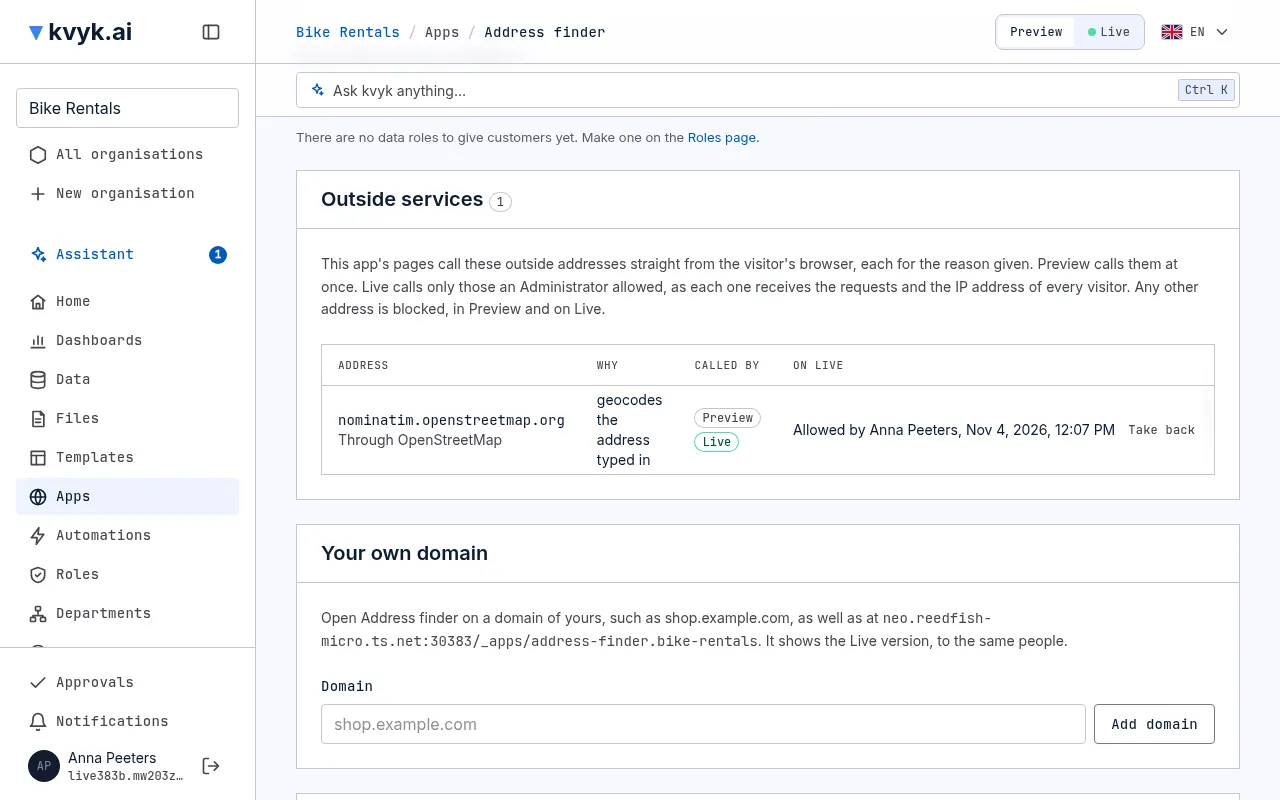
Allow an address for Live
Section titled “Allow an address for Live”An outside service the apps call is one of your organisation’s allowed services, the same list that says which services your automations may call. Live lets an app call an address once an Administrator allowed that app on the allowed service for the address. Each app is allowed on its own: when a second app calls the same service, it waits for its own allowance, and the service stays listed once.
An Administrator allows an app in any of these places, and that is the approval:
- On the app’s page, under Outside services, choose Allow beside the address and confirm.
- When you publish a version that calls an address no Administrator allowed yet, the publish card names each address and its reason and says that publishing allows them on Live. Choose Allow and publish.
- Under Technical → Allowed services, open the service and choose the app under Allow an app.
When no allowed service has the address yet, allowing it asks for the service’s Name, Receiver (the company behind it) and Purpose, and adds it to your allowed services.
When you ask the assistant to allow an address, it asks you to confirm in the chat first.
When a Builder’s app needs an address
Section titled “When a Builder’s app needs an address”A Builder can make and try the app in Preview at once. When their version calls an address the app may not call on Live yet, the Administrators are asked: it shows on their Approvals with the app, the address and why, and each gets a mail such as Allow Shop to use nominatim.openstreetmap.org?. An Administrator chooses Approve, filling in the service when there is none yet, or Reject, which keeps it blocked on Live.
Until then the Builder can publish everything else, but not that version: the card says The Administrators are asked to allow …, and the version keeps working in Preview meanwhile.
Every allowance and every taking back is listed under Technical → Events, with who did it.
Take an allowance back
Section titled “Take an allowance back”On the app’s page, choose Take back beside the address and confirm, or open the service under Allowed services and choose Take back beside the app. Live blocks it at once, and so does removing the service. A version that still calls it waits for an Administrator again before it is published.
When the app stops calling an address, it no longer reaches it from the next version you publish. The allowance stays listed with No version calls it, so you can take it back.
Good to know
Section titled “Good to know”- Only calls from the visitor’s browser are covered here. Keys for an outside service belong in Variables and secrets, never in the app’s code.
- Scripts and styles an app loads from other sites, such as a chat widget, are listed with its version: see Publish an app.
- When your app cannot reach a service, ask the assistant Why can’t my app reach …?. Usually the app does not list the address yet, or Live does not allow it yet.