Runs
See each time an automation ran, what every step did, why a run failed, and retry or stop it. Administrators get a mail when a Live run fails.
Each time an automation is set off, it makes a run. Its runs show what it did, step by step, so you can check it and find out why something went wrong.
The list of runs
Section titled “The list of runs”Choose All runs or Failed runs on Automations, or Runs on an automation’s page. The list shows the runs on the stage you are looking at, newest first:
| Column | Shows |
|---|---|
| Status | Where the run is (see below). A test run also shows Test; a check before a save shows Save let through or Save refused. |
| Started and Ended | When it began, and when it ended. |
| Took | How long it took, once it has ended. |
| Automation | Which automation ran. |
| Set off by | What started it: A record change, The schedule, A date, Started, Another service, An event, A test run or A retry. |
Filter on a status, or keep the runs of one automation only; Show all automations brings the others back.
A run is in one of these states:
| Status | Means |
|---|---|
| Queued | It is about to start. |
| Running | It is busy. |
| Waiting | It waits: for a time, for an approval, for the AI allowance to start again, or to try a step again. |
| Done | It went to the end. |
| Failed | A step failed, also after its tries, and it had no steps of its own under If this fails, or they went on to When something fails. A run that is still not done after 30 days fails too. |
| Stopped | It never started, because too many automations set each other off in a row. |
| Cancelled | Someone stopped it with Stop. |
A run’s steps
Section titled “A run’s steps”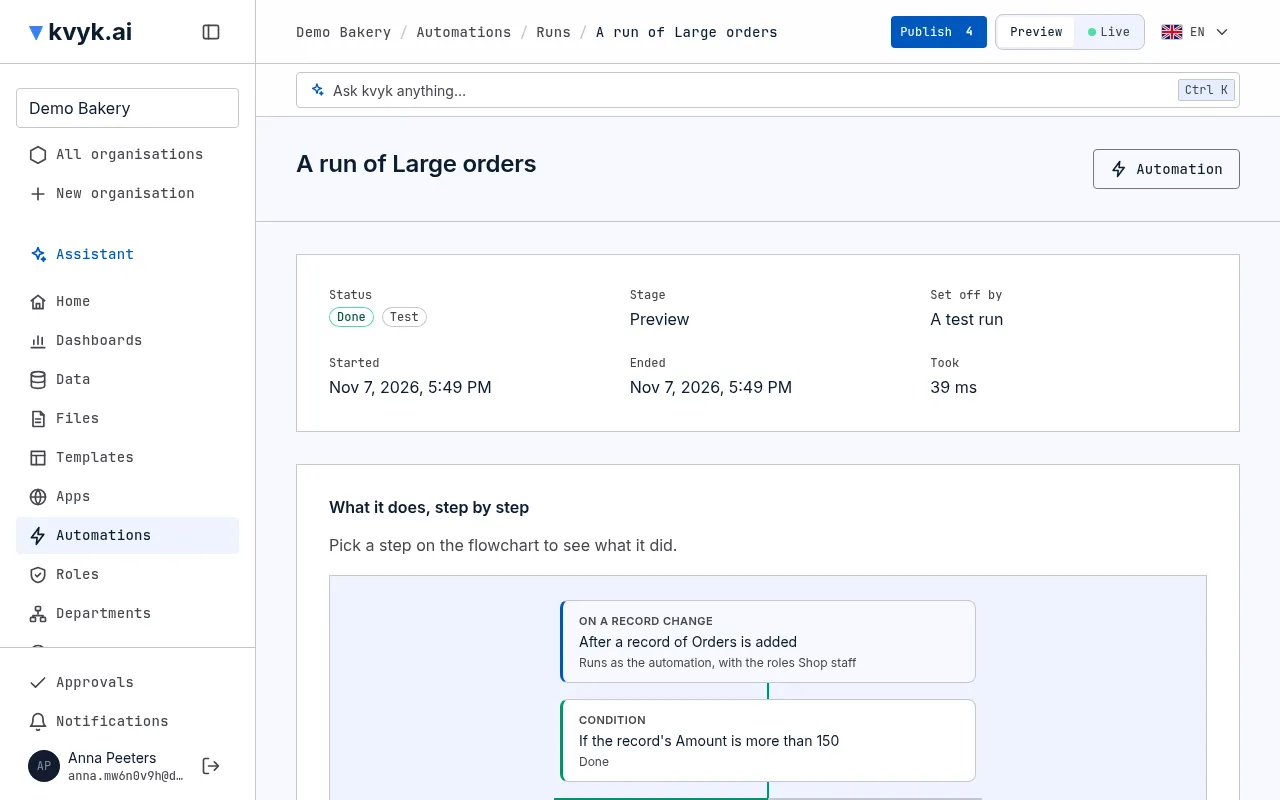
Choose a run to open it. The top says its stage, its status and, while it waits, what it Waits for. Below is the flowchart of the version it ran, with each step marked Done, Skipped, Waiting, Failed or Running. The lines follow the path the run took through its conditions and choices; the paths it did not take stay grey.
Pick a step on the flowchart to see what it did:
- Tries: how often it was tried, and when.
- What went in and What came out: the values it worked with and gave back. For a step that ran for each item of a list, each item has its own.
- Took: how long the step took, such as a call to another service.
- Log: what the step noted while it ran.
On Preview, What would have happened lists the mails, calls, approvals and notifications the run would have made, with what they would have held. On Live, What it did outside kvyk.ai lists what it really sent.
Who sees the values
Section titled “Who sees the values”A run’s values can hold personal data, so they are shown with care. On Preview, Builders and Administrators see them. On Live, only Administrators do, and each time they look it is noted in the event log. Others see the steps and their outcome, without the values.
Values are kept for 30 days. After that the run still shows its steps, their outcome and their times for a year, without the values.
Why it failed
Section titled “Why it failed”A failed run shows What went wrong at the top, with the step it Failed at and the reason in plain words, such as The service answered that the customer number does not exist. Pick that step to see what went in and what came back.
The When something fails path then runs once. Its steps show under the flowchart, or the notification to the automation’s owner, with what it said.
The reason shows in your own language, whoever reads the run. What an outside service answered is shown as it came back. A file the run makes, such as the list of rows an import refused, is in the language of the person who set the run off, or in English when nobody did.
Often the fix is in the automation itself: ask the assistant, for example Why did the run of Large orders fail, and can you fix it? It reads the run and proposes a change. Once you publish the change, new runs use it.
Retry a run
Section titled “Retry a run”Choose Retry on a failed run. It goes on from the step that failed, with the version it started with; the steps that were done are not done again.
A check before a save cannot be retried: the save it checked is already answered. Save the change again instead. Its emails and notifications, held until the save is stored, go out in a run of their own that shows here as well, and so does a run of its When refused or When something fails path.
Stop a run
Section titled “Stop a run”Choose Stop on a run that is queued or waiting, and confirm. It does not go on, and what it already did stays done.
The daily mail about failures
Section titled “The daily mail about failures”When a Live run fails, the organisation’s Administrators get a mail such as Large orders stopped with an error, with Open the run. There is at most one such mail a day for each automation, however often it fails. Test runs and runs on Preview send no mail.