Is kvyk.ai working?
The status page shows whether each part of kvyk.ai works, its uptime over 90 days, incidents and planned maintenance, and lets you subscribe by email.
The status page, at status.kvyk.ai, shows whether kvyk.ai works right now. Open it when something seems wrong: it stays up when kvyk.ai does not, and it needs no account. It speaks English, Dutch and French; choose the language at the top.
What it shows
Section titled “What it shows”- Each part of kvyk.ai as Up, Slow or Down: the dashboard, the apps, the assistant, and sign-in and mail. Each part is checked every minute.
- The last 90 days of each part, a bar per day, and its uptime over those days. Point at a day to see its uptime.
- Incidents while they are ongoing, with each update: what is wrong, which parts it touches, and what is being done.
- Planned maintenance ahead of time, with when it starts and ends.
- Past incidents and maintenance of the last 90 days.
The status page is the same for everyone: it shows kvyk.ai as a whole, not your organisation or one of your apps.
In the dashboard
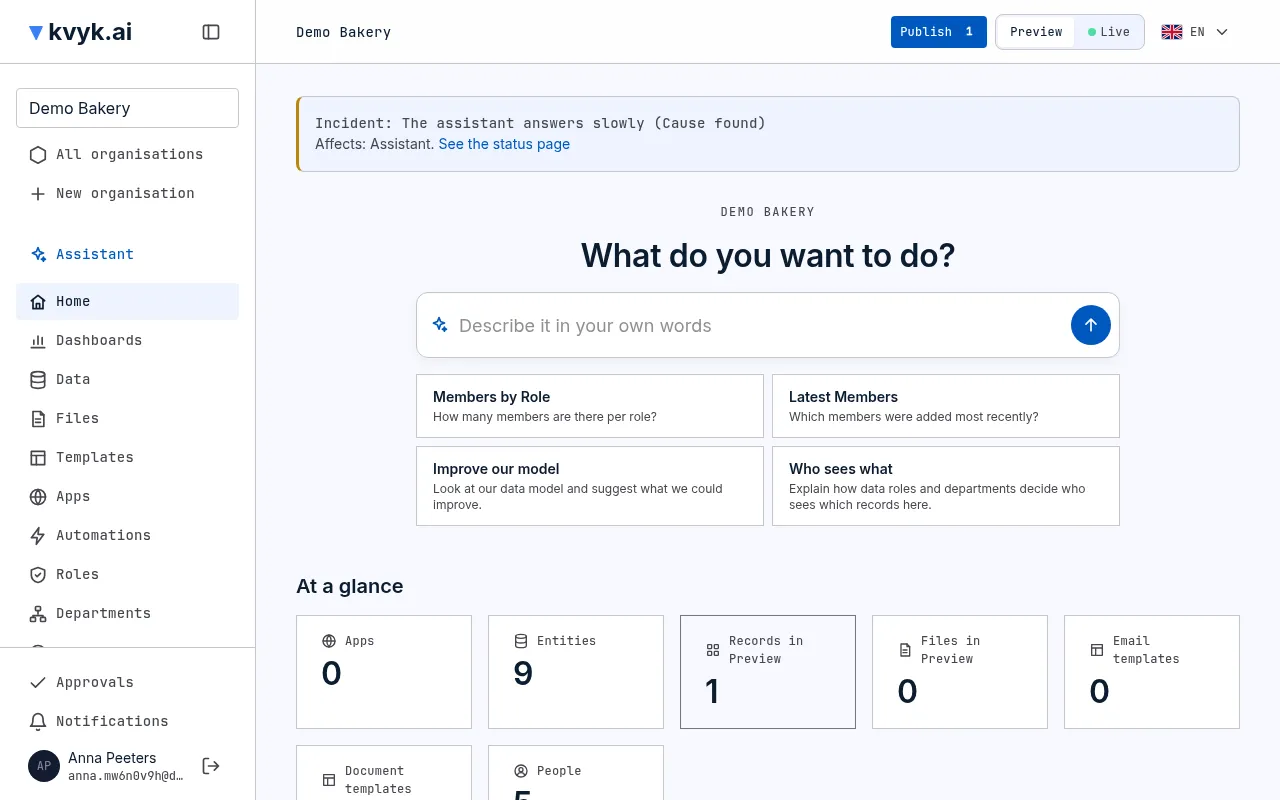
Section titled “In the dashboard”While an incident or maintenance is under way, every page of the dashboard shows a notice at the top: what it is, which parts it touches, and for maintenance when it ends. See the status page opens it for the latest updates.
Get mail
Section titled “Get mail”To hear about incidents and planned maintenance by email, enter your address under Get mail about incidents and maintenance on the status page and choose Subscribe. We send you an email to confirm your address; you get nothing else until you confirm it. Every email has a link to unsubscribe, which deletes your address at once. The privacy statement says what is kept.
The uptime kvyk.ai aims for
Section titled “The uptime kvyk.ai aims for”During early access kvyk.ai aims for 99.5% uptime a month, as a target and not a promise; the terms say so.