Files
Keep pictures and documents with your records, find them on the Files page, and see how much storage they use.
Files live with your records: in a Files field on any entity, such as an employee’s photo or an invoice’s PDF, or in the built-in Documents entity for files that belong to no other record. See Data model for adding a Files field and for Documents.
Every file is checked for viruses before anyone can open it, and up to 20 MB. Whoever may see a record and its field may see its files, and only they. A file you take out of a record, or whose record you delete, is deleted too.
The Files page
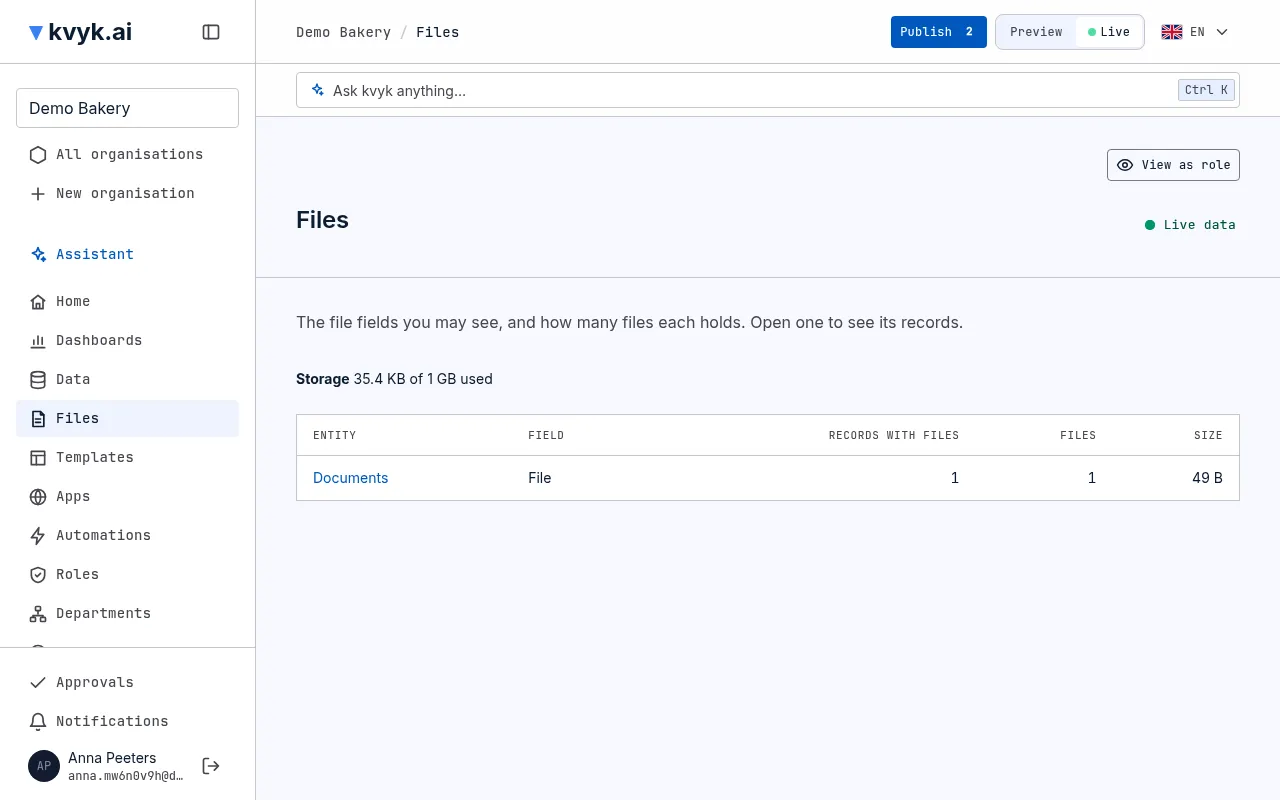
Section titled “The Files page”Choose Files in the sidebar. It lists every Files field you may see, in Preview or Live, with how many records hold files there, how many files and how large. Choose an entity to open its records that hold files in that field.
Storage
Section titled “Storage”The Files page also says how much storage your organisation’s files use, out of what its plan allows: 5 GB on the Free plan. When the files would use more, a new file is not added, and kvyk.ai says so. Remove files you no longer need, or ask kvyk.ai about a larger plan. Files you send to the assistant do not count; documents made from a template do.
Files in apps
Section titled “Files in apps”Apps built with the assistant show a record’s files to whoever may see the record: pictures in the page, other files to download. Members and signed-in customers add files in an app’s forms, where their data roles let them add or change those records, the same as for the records themselves. Each file is checked for viruses like any file, counted in your storage, and removed with its record. Visitors who have not signed in see files but cannot add them. To put one of these files in the app itself, such as a photo for its home page, send it to the assistant from the Library of the + button beside the chat box. See Build an app with the assistant and Send it files.