Assistant use and limits
How much of your plan's assistant allowance your organisation uses, in credits, when it starts again, and what to do when it is used up.
Your organisation’s plan gives it an allowance for the assistant, counted in credits. The more the assistant does for a message (reading, building, checking an app), the more credits it takes: a question about your data takes about 1 credit, a new small app about 15 and a change to an app about 20. Plans and their limits says what each plan’s credits are good for.
Two windows that start again
Section titled “Two windows that start again”The allowance holds in two windows, for example every 5 hours and every 7 days:
- A window starts with the first message after the last one ended, and starts again from nothing when it ends.
- Each message counts in both windows.
- When either window is used up, the assistant waits until it starts again.
A message the assistant is already working on always gets its answer, also when it goes over the allowance; the next message waits.
Each member’s share
Section titled “Each member’s share”So that one person cannot use the whole allowance, an Administrator can let each member use at most part of it in a window, such as half. Your plan says how much to start with.
See how much is used
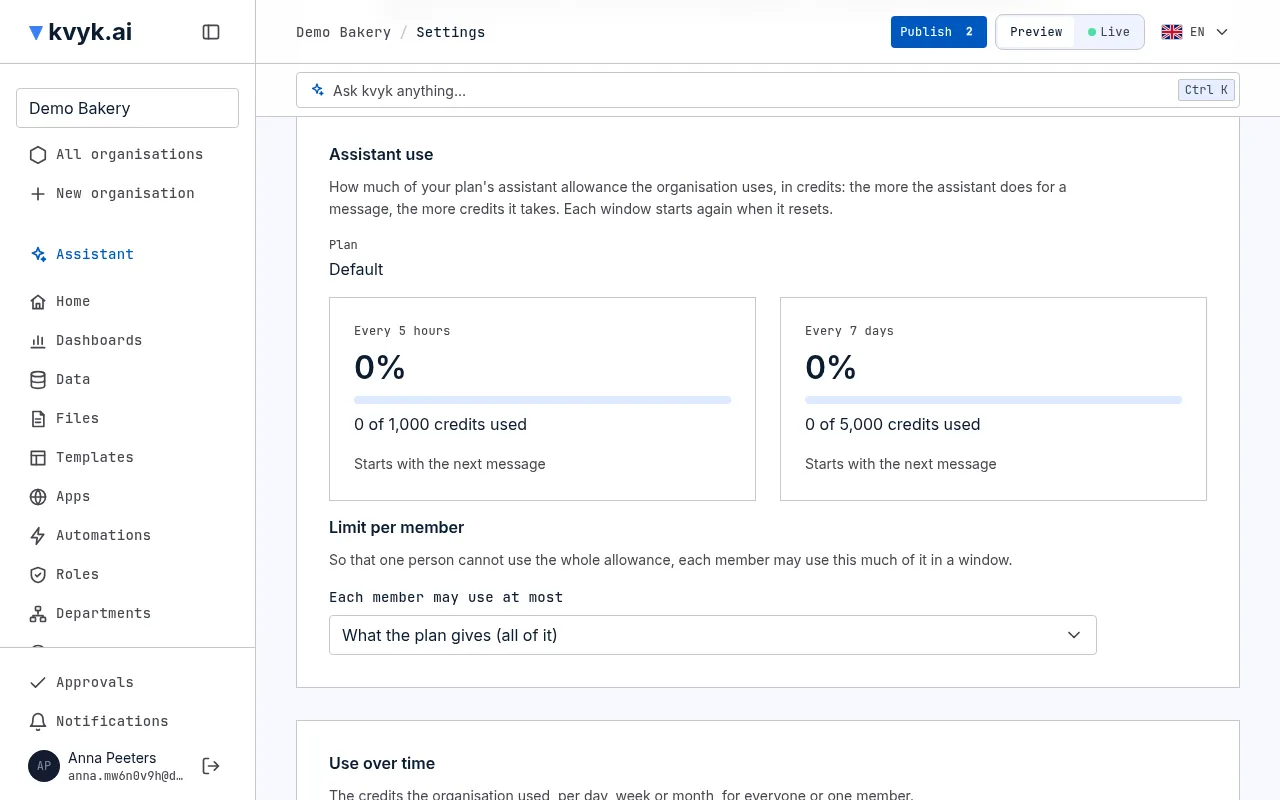
Section titled “See how much is used”Settings shows, under Assistant use, for everyone in the organisation:
- your plan’s name;
- a tile for each window: the part of it used, in large, how many credits are used and how many the plan gives, as a bar that fills up, about how many questions or new apps the window’s credits are good for, and when the window starts again (or that it starts with the next message);
- your own use, when each member has a share.
Administrators also see:
- Limit per member, with Each member may use at most: choose what the plan gives, all of it, or a part (75%, 50%, 33%, 25% or 10%).
- Use over time: the credits used per day, week or month over the last 7 days, 30 days, 90 days or 12 months, for the whole organisation or one member, as a chart and a table, in a section of its own. Under Who, type a name or email address to find a member who used the assistant in the period. Each member side by side lists each member’s credits and messages in the period.
You can also ask the assistant, for example How much of our allowance is left? or When can I use the assistant again? It answers from the same figures as Assistant use, and gives the use over time and per member only to Administrators.
When the allowance is used up
Section titled “When the allowance is used up”When you send a message and the allowance, or your share of it, is used up, the assistant says until when, in your own time, and what you can do:
- wait until the window starts again; or
- ask an Administrator to change the plan, or to give each member a larger share. An Administrator can pay for Pro.
Your message is not lost: send it again once the window has started again.
See also Organisation settings.